
Quickly Convert JSON to C# Classes in Visual Studio
TLDR
- Visual Studio has a built-in "Paste JSON as Classes" feature that automatically converts JSON strings into C# class structures.
- This feature is suitable for quickly creating basic data models, but when used as DTOs, additional type checking, naming mapping, and data validation are required.
- If JSON field naming does not follow C# conventions, it is recommended to use the
[JsonPropertyName]attribute for mapping.
Core Feature: Quickly Convert JSON to C# Classes
When do you encounter this problem: When developers need to quickly create corresponding C# data models or DTOs based on the JSON structure returned by an API.
Using Visual Studio's "Paste Special" feature can save time spent manually writing class properties. The steps are as follows:
- Copy the target JSON string.
- Move the cursor to the target location in the Visual Studio editor.
- Click the menu: Edit → Paste Special → Paste JSON as Classes.
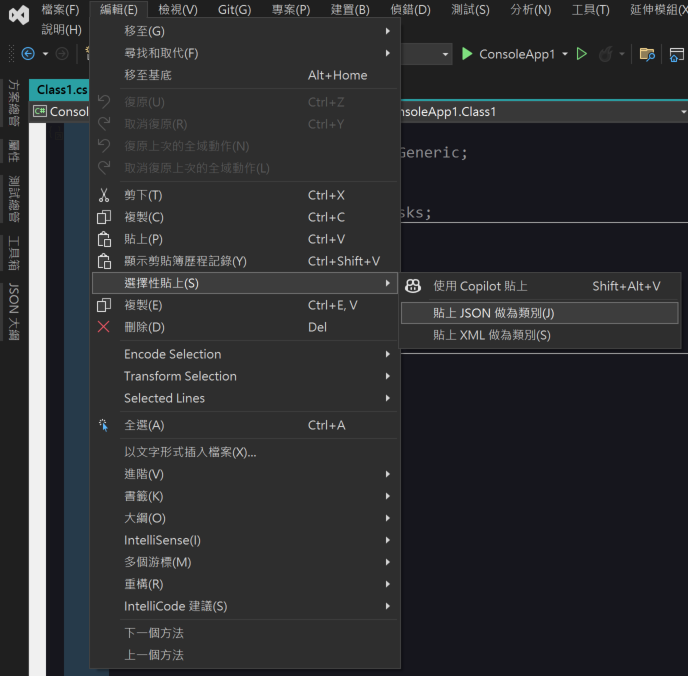
Execution Result Example
If you input the following JSON:
{
  "User": {
    "Id": "Wing",
    "Name": "小翼",
    "Dept": {
      "Id": "SAO",
      "Name": "艾恩葛朗特"
    }
  }
}The system will automatically generate the corresponding class structure:
public class Rootobject {
    public User User { get; set; }
}

public class User {
    public string Id { get; set; }
    public string Name { get; set; }
    public Dept Dept { get; set; }
}

public class Dept {
    public string Id { get; set; }
    public string Name { get; set; }
}DTO Development Considerations
When do you encounter this problem: When automatically generated classes are used directly for API integration or data transmission, failure to check them may lead to deserialization errors or naming non-compliance.
Automatically generated classes are only basic structures. In actual project applications, please be sure to perform the following checks:
- Type Checking: Confirm whether the automatically generated property types (such as string, int, bool, etc.) meet actual business requirements.
- Naming Conventions: If the JSON key names do not match C# property naming conventions (e.g., if the JSON is in snake_case), it is recommended to use the
[JsonPropertyName]attribute for mapping to ensure data is mapped correctly. - Data Validation: Automatically generated classes do not contain validation logic; please add appropriate validation attributes or logic according to business requirements.
TIP
If you need to display double curly braces in your code, please be sure to wrap them in a code block, for example: { { Property } }.
Change Log
- 2025-05-27 Initial document creation.